Why the Automatic OAuth Flow Fails with MCP in Antigravity (and How to Fix It)
The Model Context Protocol (MCP) is the latest buzz in the AI world: Instead of building separate REST API wrappers for each service, your AI agent (like Google Antigravity) connects directly to external tools via a standardized interface.
Sounds brilliant? It is! At least in theory.
In practice, you quickly run into a huge problem: the automatic OAuth flow for remote MCP servers. Also dynamic client registration (DCR). If you try to connect services like HeyGen or Meta Ads via their official Remote MCP endpoints, you’ll suddenly be 401 Unauthorized errors start popping up left and right.
By the way, OAuth works perfectly fine with Claude and ChatGPT/Code. It’s just Google causing trouble again.
In this post, I’ll show you exactly what’s behind the automatic OAuth flow in MCP, why it currently fails so often in Antigravity, and how we’ve permanently solved the problem using two specific real-world examples (HeyGen & Meta Ads) via local Stdio servers.
What is the Model Context Protocol (MCP) and the OAuth flow?
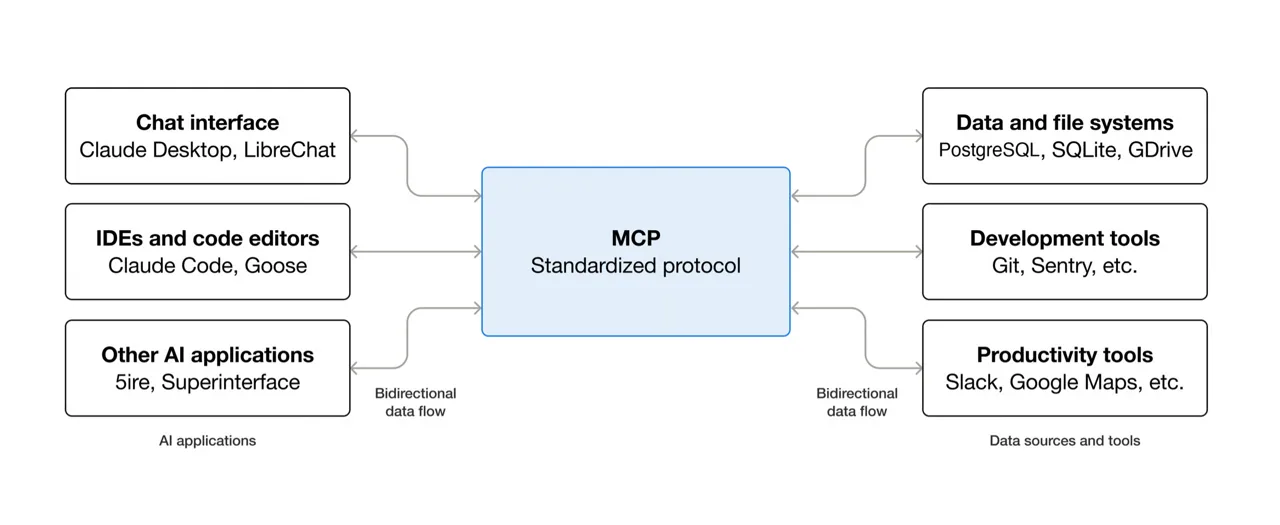
The Model Context Protocol (MCP), created by Anthropic, fundamentally distinguishes between two ways an agent communicates with tools:
- Local Stdio Transports: The AI agent launches a script or CLI tool (in Python, Node.js, etc.) locally on your computer and communicates via
stdin/stdout. Authentication is usually handled simply via environment variables such asAPI_KEY. - Remote SSE Transports: The agent connects to a hosted remote server on the network via Server-Sent Events (SSE) (e.g.,
https://mcp.heygen.com/mcp/v1/orhttps://mcp.facebook.com/ads).
With Remote MCP, providers (rightly) want to avoid having you share secret API keys in plain text. Instead, they rely on OAuth 2.0 (PKCE).
How the OAuth flow is actually supposed to work:
- Your agent sends a
initializerequest to the remote MCP endpoint. - The server responds with
401 Unauthorizedand an OAuth challenge header. - Your development environment (IDE or CLI) intercepts this, automatically opens a browser window, and prompts you to log in.
- After logging in, the server sends an access token back to the agent, and the tools are ready to use.
The Problem: Why the OAuth Flow Fails in Antigravity
In reality, there are two main reasons why this nifty OAuth flow fails in Antigravity (CLI & Agent Runner):
- Lack of interactive browser handling in the background runner: Unlike fully integrated desktop apps, the CLI’s background process often fails to properly intercept the OAuth handshake with a browser pop-up. The
initializecall simply fails with a401 Unauthorized, and Antigravity completely removes the server from the tool list. - Restrictive API scopes & beta restrictions: Remote endpoints such as Metas
mcp.facebook.com/adsrequire specific beta permissions (e.g.,ads_mcp_management). If you pass a normal, fully valid Graph API token as aBearerheader, the remote server will strictly reject it. - Redirect URL: If the MCP provider hasn’t configured the redirect URL for your client (Antigravity), the OAuth process will also fail. That’s what happened to me with Heygen.
Case Study 1: HeyGen Remote MCP
The Problem
When attempting to integrate HeyGen’s official remote endpoint, the original mcp_config.json looked like this:
{
  "mcpServers": {
    "heygen": {
      "serverUrl": "https://mcp.heygen.com/mcp/v1/"
    }
  }
}
Upon launch, Antigravity immediately reported:Encountered error in step execution: server name heygen failed to load: calling "initialize": sending "initialize": Unauthorized
The remote endpoint required an OAuth login in the browser. Although I was able to start the process via Antigravity Settings > Customization, the process still failed.
The Fix
Instead of relying on the OAuth remote server, we installed the official Python package heygen-mcp in the local Python environment and switched the configuration to Stdio:
{
  "mcpServers": {
    "heygen": {
      "command": "/Users/jochen/.gemini/mcp-venv/bin/heygen-mcp",
      "env": {
        "HEYGEN_API_KEY": "sk_V2_DEIN_HEYGEN_API_KEY"
      }
    }
  }
}Result: Antigravity launches the package locally, uses your HeyGen API key in the background, and provides all avatar and video tools without any login hassles!
Case Study 2: Meta Ads Remote MCP
With Meta Ads, the problem was even trickier.
Of course, the Meta Ads MCP couldn’t simply be authenticated via OAuth in the browser either.
The problem
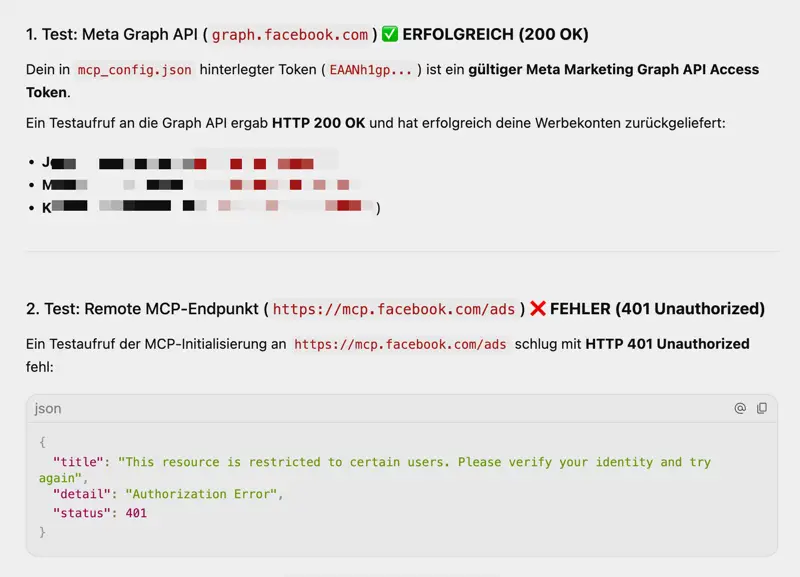
Meta’s official server https://mcp.facebook.com/ads returned the following error despite the Authorization: Bearer header:
{
  "title": "This resource is restricted to certain users. Please verify your identity and try again",
  "detail": "Authorization Error",
  "status": 401
}
Although the token works for direct REST requests to graph.facebook.com/v20.0/ with 200 OK and returned all advertising accounts, the remote MCP server refused to provide the service.
The fix: Our own local FastMCP server
Since the Meta token was completely intact, we built our own local FastMCP server in just a few lines of Python using the library FastMCP :
meta_ads_mcp.py (Script):
#!/usr/bin/env python3
import os
import httpx
from mcp.server.fastmcp import FastMCP

# MCP Server Instanz erstellen
mcp = FastMCP("meta-ads", instructions="Meta Ads Management & Reporting Tool")

ACCESS_TOKEN = os.environ.get("META_ACCESS_TOKEN")
GRAPH_URL = "https://graph.facebook.com/v20.0"

@mcp.tool()
def meta_get_ad_accounts() -> str:
    """Listet alle verknüpften Meta Werbekonten auf."""
    url = f"{GRAPH_URL}/me/adaccounts"
    params = {
        "access_token": ACCESS_TOKEN,
        "fields": "id,name,account_status,currency,account_id"
    }
    with httpx.Client(timeout=30.0) as client:
        r = client.get(url, params=params)
        return r.text

@mcp.tool()
def meta_get_insights(ad_account_id: str, date_preset: str = "last_30d", level: str = "account") -> str:
    """Holt Performance-Metriken (Spend, CPC, CTR, ROAS) für ein Konto oder eine Kampagne."""
    if not ad_account_id.startswith("act_"):
        ad_account_id = f"act_{ad_account_id}"
    url = f"{GRAPH_URL}/{ad_account_id}/insights"
    params = {
        "access_token": ACCESS_TOKEN,
        "date_preset": date_preset,
        "level": level,
        "fields": "campaign_name,spend,impressions,clicks,cpc,ctr,purchase_roas,date_start,date_stop"
    }
    with httpx.Client(timeout=30.0) as client:
        r = client.get(url, params=params)
        return r.text

if __name__ == "__main__":
    mcp.run()
Adjustment in the mcp_config.json:
Instead of the remote URL, we now connect Antigravity to our local script:
{
  "mcpServers": {
    "meta-ads": {
      "command": "/Users/jochen/.gemini/mcp-venv/bin/python3",
      "args": [
        "/Users/jochen/.gemini/mcp-venv/bin/meta_ads_mcp.py"
      ],
      "env": {
        "META_ACCESS_TOKEN": "EAANh1gp_DEIN_META_TOKEN"
      }
    }
  }
}
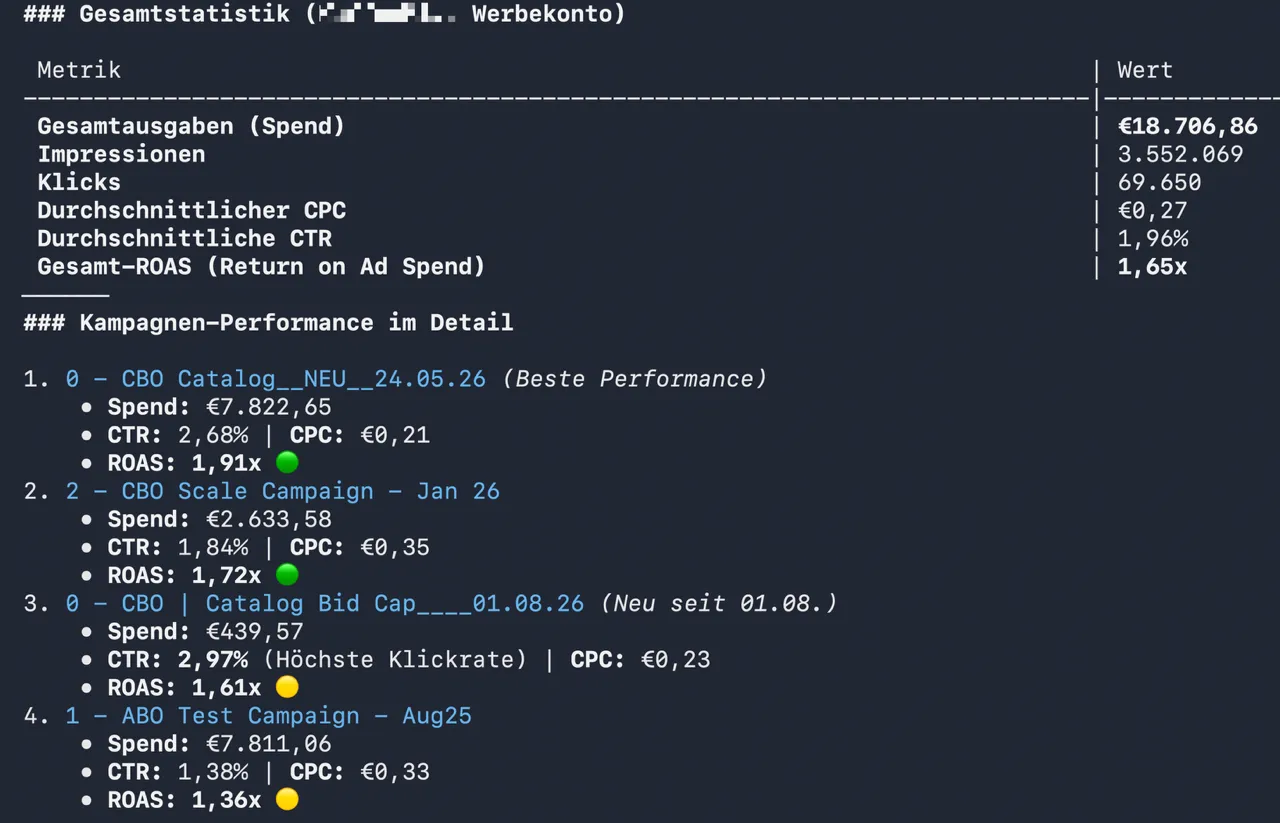
The result: The local server starts up in milliseconds. Antigravity can immediately retrieve live data. In our test, for example, it read €18,706.86 in donations and a ROAS of 1.91x for the best campaign!
Conclusion & Recommendation for Your MCP Practice
Remote MCP servers with OAuth sound like the future, but in many CLI agents they’re still in their infancy or fail due to hidden API restrictions imposed by providers.
My tip:
If a remote MCP server throws an error in Antigravity 401 Unauthorized , don’t waste time appending headers to remote URLs.
Instead, build yourself a small local Stdio wrapper using FastMCP (Python) or the TypeScript MCP SDK. You’ll retain full control over your API tokens, avoid annoying browser logins, and your agents will run stably and at lightning speed!