B2BKing: The Ultimate B2B & Wholesale Suite for WooCommerce
Standard WooCommerce is inherently built for B2C retail. While it excels at selling directly to single consumers, setting up a wholesale, B2B, or hybrid B2C/B2B store on the platform is notoriously difficult. Traditionally, store owners had to choose between subscribing to expensive enterprise SaaS solutions like Shopify Plus or installing a fragile stack of 10+ single-purpose plugins.
All-in-one WooCommerce suite for B2B, wholesale, and hybrid shops: registrations, VAT checks, group pricing, bulk discounts, quote requests, bulk ordering, subaccounts, and rules for minimum quantities, payment methods, and shipping. Ideal for scalable wholesale stores.
I’ve taken a close look at the plugin and its features to show you what B2BKing by KingsPlugins is all about, how it performs, and why it might be the right wholesale solution for your WooCommerce website.
B2BKing – Powerhouse Wholesale Suite Meets WooCommerce
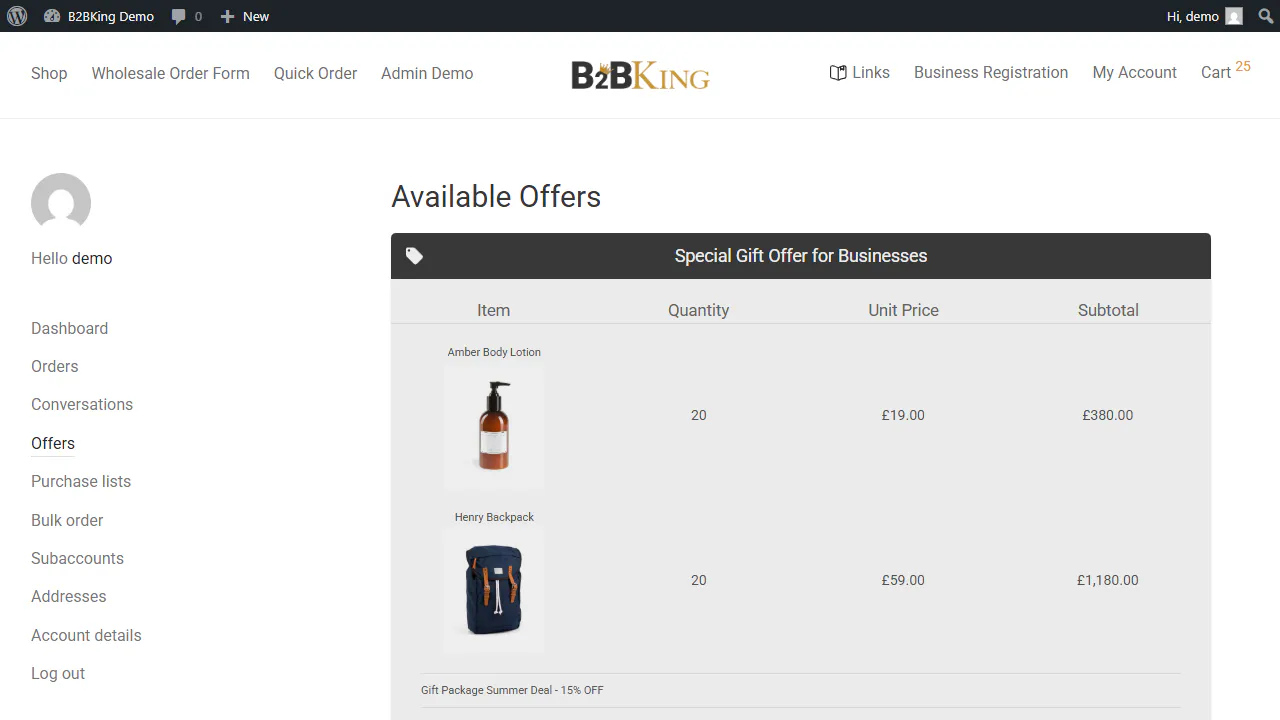
The core philosophy behind B2BKing is simple: Unified control instead of plugin bloat.
Instead of configuring and maintaining separate plugins for registration, quotes, tax exemptions, tiered pricing, and corporate subaccounts, B2BKing consolidates 137+ features into a single, cohesive ecosystem.
It is built for two main setups:
- Pure B2B Stores: Completely hidden from the public, requiring login to view prices and purchase.
- Hybrid B2B + B2C Stores: Allowing guest customers to browse and buy at retail prices, while logged-in wholesale groups automatically see custom pricing, tax rules, and layout features.
The Setup Assistant: Quick and Easy Onboarding
Configuring a B2B store can feel overwhelming, but B2BKing simplifies this with a step-by-step setup wizard.
During the initial activation, the wizard prompts you to select:
- Your shop type (Pure B2B vs. Hybrid B2C/B2B).
- Your tax configuration (whether to display prices including or excluding tax for B2B vs. B2C users).
- Initial registration roles (e.g., standard B2B, reseller, manufacturer).
Once configured, you are redirected to the B2BKing Dashboard.
Dashboard & CRM Hub: B2B Analytics and Customer Management
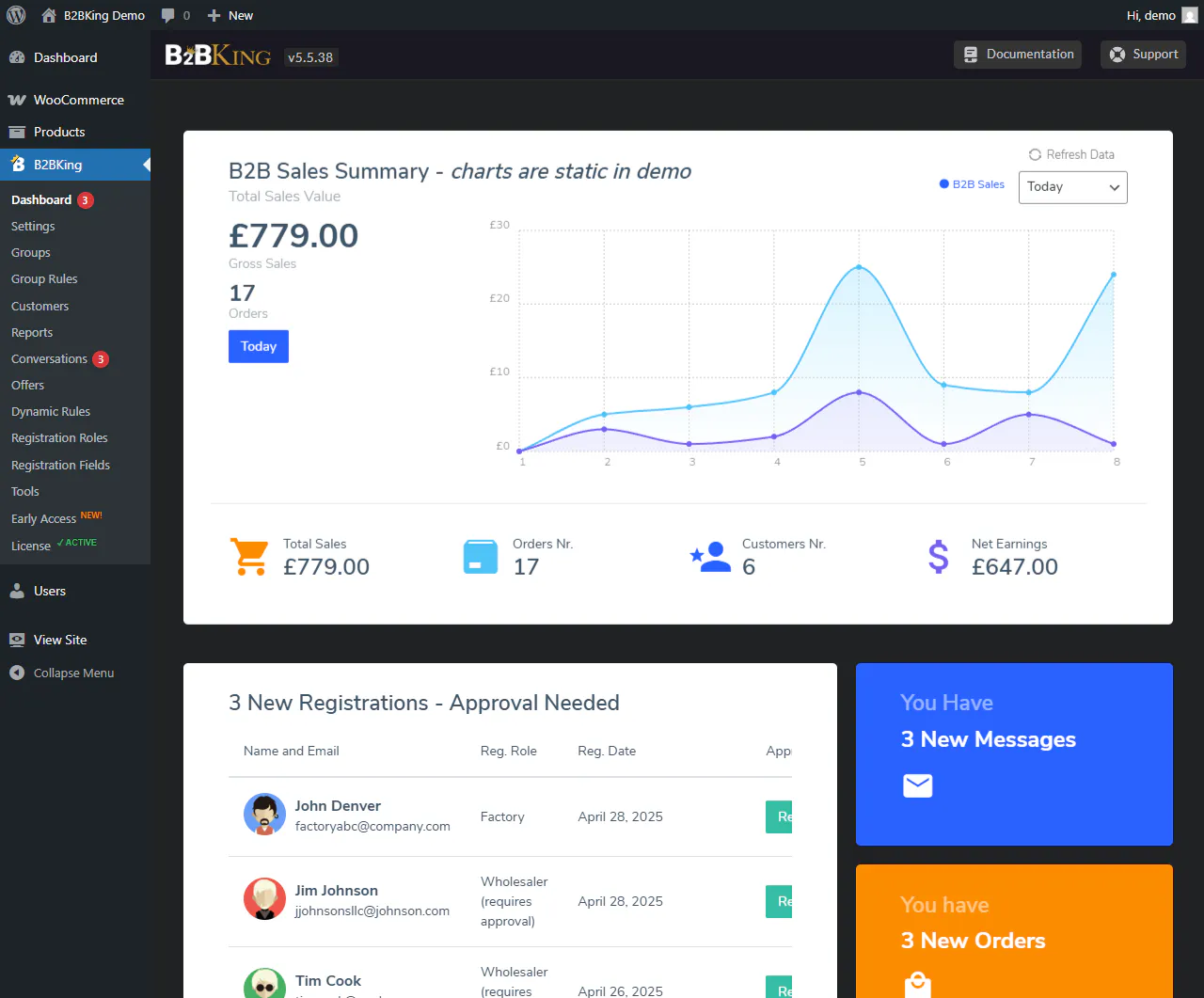
The backend dashboard acts as your central control station for managing business relationships. Instead of jumping between multiple menus, B2BKing gathers all customer logs, registration approvals, and user accounts in one place. It also integrates reporting tools specifically tailored to track wholesale transactions so you can make data-driven decisions. The main screen provides a comprehensive overview of your sales performance and pending actions:
- B2B CRM & Customer Management: Easily approve or reject pending B2B registration requests, assign users to specific wholesale groups, and adjust individual profiles.
- Sales Reports & Analytics: Visualize sales volume, order distribution, and performance metrics specifically for B2B user groups over different timeframes.
- Subaccounts Tracking: Monitor corporate accounts and check which orders were placed by which subaccount user.
Core Features Walkthrough
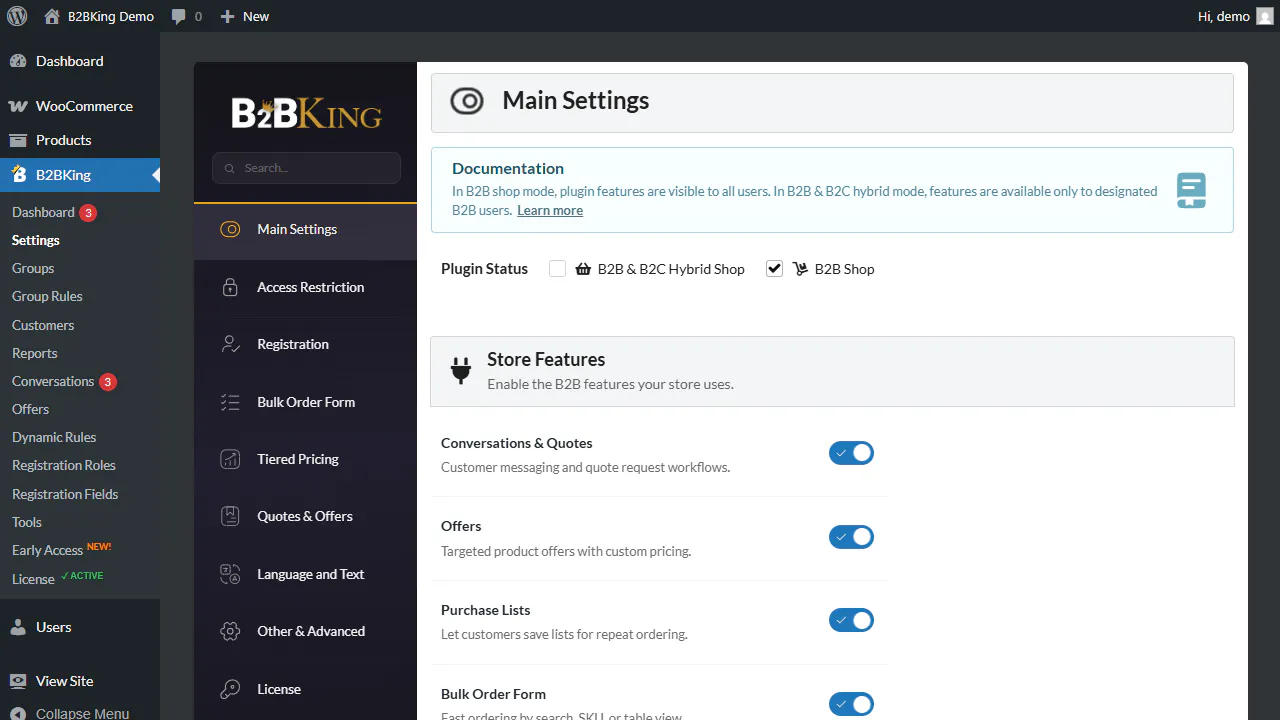
B2BKing organizes its settings and capabilities into key functional areas:
1. Extended B2B Registration & VAT Validation
To run a legal B2B business, you need to collect detailed corporate verification data during registration. B2BKing extends the standard, limited WooCommerce registration form by adding highly configurable billing and business information fields. It also automates the process of validating buyer tax compliance to save store managers hours of manual work. Here is how B2BKing structures registration:
- Custom Form Fields: Create fields for company names, registration numbers, or file uploads (e.g., business licenses).
- Auto-VAT VIES Validation: Integrate a dedicated VAT field that automatically validates European VAT numbers in real-time via the official VIES database, applying tax exemptions instantly.
- Approval Moderation: Manually review and approve registrations or let trusted user groups bypass moderation automatically.
2. Customer Groups & Wholesale Pricing
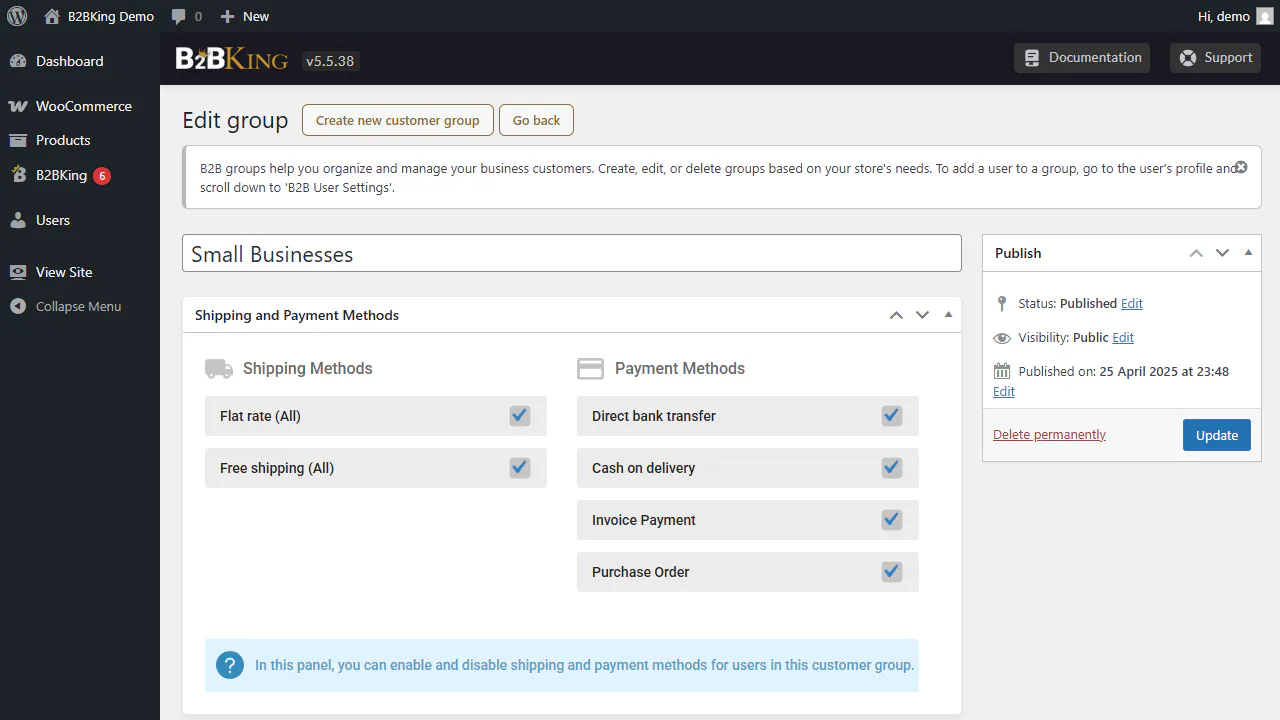
One of the most critical requirements for wholesale shops is the ability to show different prices to different buyers. B2BKing lets you segment business clients into custom groups so you can tailor your catalog to every client relationship. It replaces standard prices with custom wholesale, group-specific, or volume-based pricing dynamically. Key features in this module include:
- Group Pricing: Set custom prices for products or variations per group (e.g., Wholesalers, VIPs, Distributors).
- Tiered Price Tables: Display a structured tiered pricing table directly on the product page to encourage bulk purchasing (e.g., Buy 10+ for 5% off, 50+ for 15% off).
- MSRP/RRP Displays: Show recommended retail prices alongside wholesale pricing to highlight the savings.
3. Bulk Ordering & Requisition Lists
Wholesale buyers place large, recurring orders and value ordering speed above all else. They rarely browse product pages and instead expect to quickly enter SKUs or add items in bulk. B2BKing introduces dedicated interfaces that mimic classic enterprise supply-chain portals to optimize the buying flow. Buyers can utilize these tools to speed up their purchase:
- AJAX Bulk Order Form: A high-speed order form with search autocompletion and instant subtotal calculations.
- Purchase & Requisition Lists: Let customers save order configurations to their “My Account” area so they can re-add them to the cart in a single click.
- CSV Upload: Buyers can upload a simple CSV file with SKUs and quantities to check out in seconds.
4. Quotes & Built-in Messaging (Conversations)
Unlike B2C e-commerce where prices are set in stone, wholesale commerce is deeply dependent on direct negotiation. Custom contracts, bulk discounts, and shipping negotiations are standard practices for larger wholesale contracts. B2BKing integrates a complete quote management system to streamline negotiations without relying on external emails. Store owners can handle quoting and messaging directly in WordPress:
- Request a Quote: Replace the cart button with a “Request a Quote” button globally, for specific groups, or for individual products.
- Built-in Chat System: A dedicated messaging center in the “My Account” area allows buyers and admins to discuss order parameters, shipping terms, and pricing.
- Custom PDF Offers: Generate formal price quotes as PDF documents and email them directly to customers. The buyer can review, click, and purchase the offer instantly.
5. Dynamic Rules & Constraints
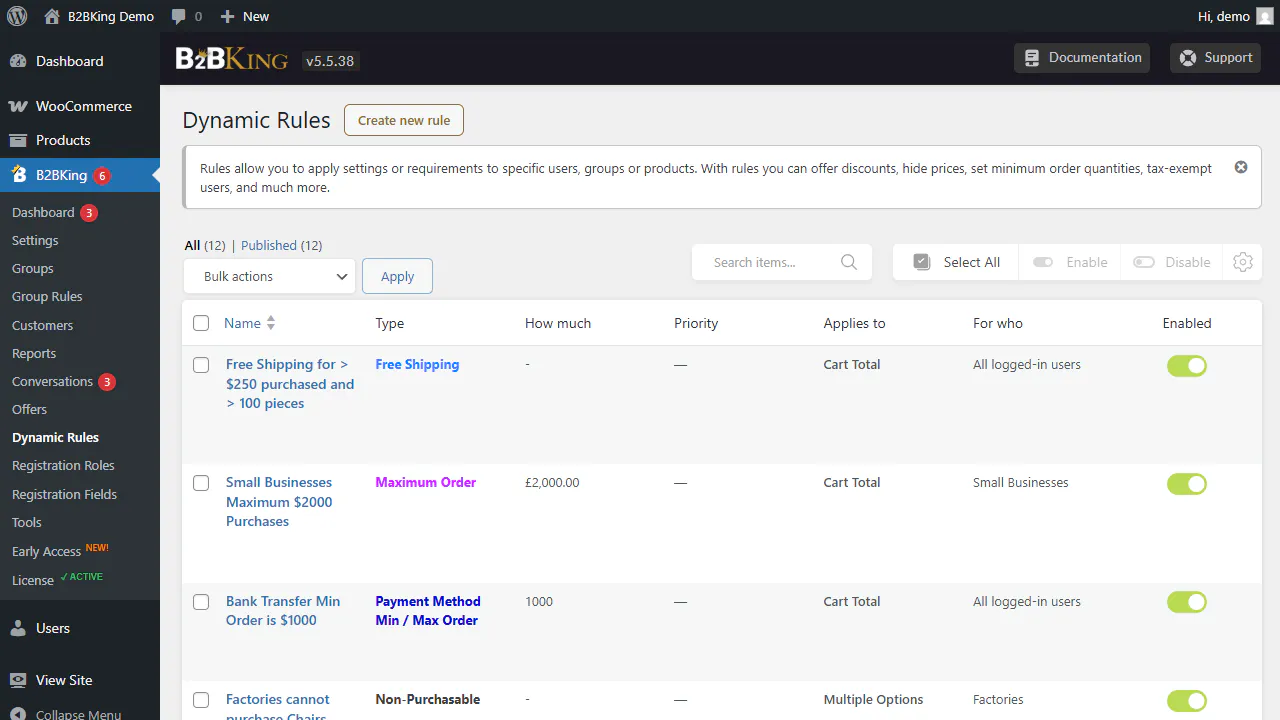
The dynamic rules engine is B2BKing’s most flexible feature and acts as the brain of your B2B logic. It allows store managers to create precise conditional triggers that govern how, when, and what customers can purchase. This keeps order values high and helps you enforce minimum shipping and logistical requirements automatically. The dynamic rules allow you to configure conditions like:
- Minimum/Maximum Thresholds: Require a minimum order value (e.g., $500) or minimum item quantities for specific groups.
- Quantity Steps: Force buyers to purchase in multiples (e.g., only in packs of 6, 12, 18).
- Payment & Shipping Controls: Restrict or enable specific payment gateways (like Purchase Orders or Invoices) or shipping methods based on user roles or group status.
6. Corporate Subaccounts
Corporate buyers usually have purchasing teams where different staff members perform different tasks. A junior buyer might build a shopping cart, while a finance manager is the only one authorized to approve and pay for it. B2BKing supports this business reality by offering multi-user organizational management. Corporate accounts can configure their structure using these options:
- Multi-User Accounts: Main corporate accounts can create subaccounts for their team.
- Permission Control: Set granular permissions (e.g., allow Employee A to compile cart contents but require approval from the Manager account before ordering).
Performance Optimization
With 137+ features, performance is a natural concern. However, B2BKing is built with speed in mind.
It uses clean code structures and includes a modular system, allowing you to disable features you do not need. Additionally, the developers offer a comprehensive speed optimization guide to ensure database queries remain lightweight even with thousands of registered wholesale customers.
Who is B2BKing Perfect For?
B2BKing is an ideal fit if you:
- Run a retail WooCommerce store and want to expand into wholesale without launching a separate website.
- Need automated tax exemptions and EU VAT registration checkouts.
- Require custom quote negotiations, custom billing options, or invoice gateways.
- Want to move away from expensive, monthly B2B SaaS pricing to a one-time license fee model.
Pricing: Incredible Lifetime Value
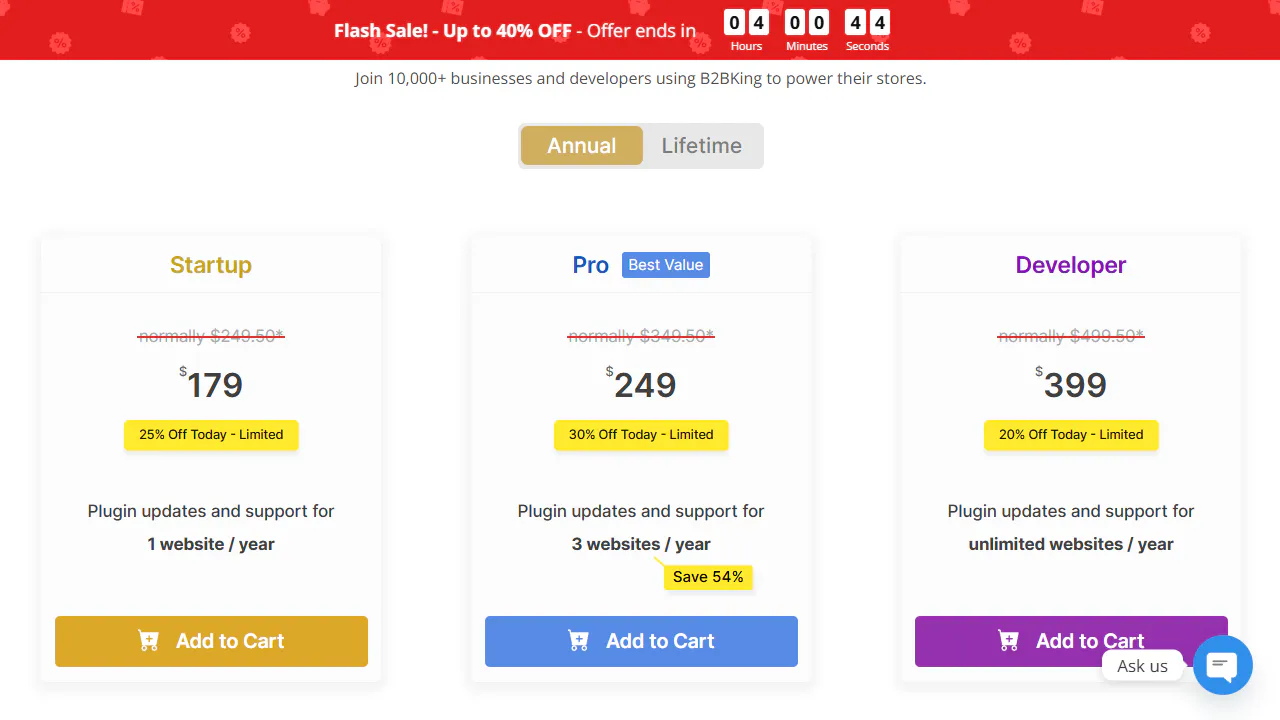
While SaaS platforms charge hundreds of dollars per month for B2B features, B2BKing offers a highly competitive one-time purchase:
- Regular Price: $249 (often discounted down to $179).
- License Includes: Lifetime updates, premium customer support, and access to all core wholesale modules without hidden add-on costs.
Conclusion: The Ultimate WooCommerce Wholesale Engine
B2BKing stands out as the most complete B2B plugin on the market. It eliminates the frustration of managing multiple conflicting plugins by integrating registration, pricing rules, quotes, subaccounts, and payment gateways into a single, clean workspace.
If you are looking to scale your WooCommerce store into the wholesale market, B2BKing provides the enterprise-grade features you need at a fraction of the cost.